


Koma - AI Manga & AI Comics
3.733.00 Reviews
App Specs
- Version
- 1.0.7
- Updated On
- License
- Free
- Downloads
- 10,000+
- Developer
- TUNESPHERE
- Categories
- Comics
- Platform
- Android
Screenshots
 Analysis by AppCompare
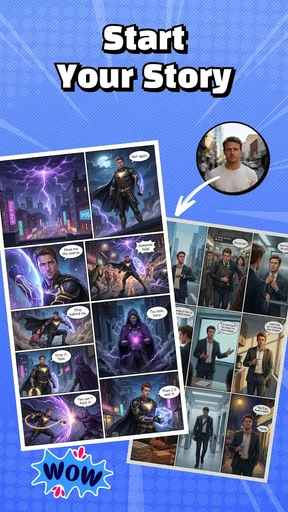
I’d think of Koma - AI Manga & AI Comics as a quick way to turn a story idea into something visual, rather than a full replacement for a drawing studio. That distinction matters: it’s most appealing when you want to experiment with comic-making and don’t want every step to depend on drawing skill. I’d use it to explore a scene, test a visual direction, or make a rough comic to share—not assume that an AI-assisted draft will arrive ready for print or publication.
A creative tool that is still finding its footing
Koma is a free comics app from TUNESPHERE, with a 3.7 average from around 270 ratings and over 10,000 installs. Its Everyone age rating makes it broadly accessible, while optional in-app purchases, ranging from $4.99 to $79.99 per item, are worth keeping in mind before building a regular workflow around it. The current version is 1.0.7, following its release on December 31, 2025, so I’d approach it as a relatively early product rather than a long-established comic platform.
That version number tells me where the app stands now; it doesn’t, by itself, show how much has changed since launch. I wouldn’t assume that a particular feature was recently added or improved without a clear version history. For someone already using it, the practical question is whether the current tools fit the way they make comics, not whether the version label promises a specific new capability.
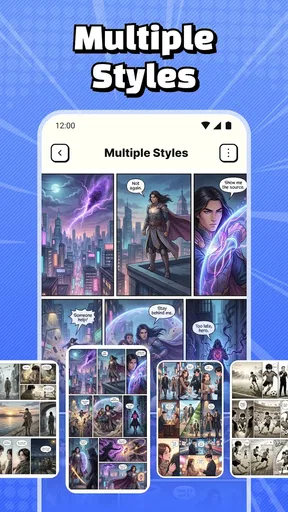
My overall impression is that Koma’s central appeal is lowering the barrier between an idea and a comic-like result. It gives people who may not draw confidently a place to start, and the range of visual styles encourages exploration. The trade-off is that AI-assisted creation can make it harder to control every detail, so artists who need consistent character designs, precise panel composition, or a polished production pipeline may find a dedicated drawing or page-layout app more dependable.
Where a few small choices can improve the result
When I’m working from a vague idea, I find it useful to settle the scene before asking for images: who is present, what each person wants, and what changes by the end. That simple bit of planning gives the comic a stronger center than choosing an art style first and hoping a story appears around it. I’d also keep each scene focused on one clear action. A crowded prompt or a panel that asks the AI to convey several events at once can make the result harder to read.
For a short project, I’d start with a single moment—such as a character arriving late, finding a mysterious note, or trying to hide a mistake—then build panels around the change in that moment. This gives me a way to judge whether the visual direction works before committing to a longer story. It also makes revisions less frustrating: if the idea isn’t landing, I can change the scene rather than trying to rescue a whole chapter.
Style selection is useful, but I’d treat it as a storytelling choice, not decoration. A lighter look may suit a playful exchange, while a more dramatic treatment can support a tense reveal. If a sequence feels inconsistent, I’d simplify the visual brief and keep the same character descriptions and setting details from panel to panel. That is a practical habit for AI comic tools generally, and it can help make a sequence feel more intentional even when the generated details vary.
Worth Reading Before You Choose

Baby Panda World Brings Quick Play to Modern Phones, but Its Game Library Feels Busy

ESPN’s Live Game View Makes Following Close Games Easier

QuizzLand Review: A Good Fit for Short Trivia Breaks, Not Every Player

Basketball Stars: Multiplayer Is Fast, but Can It Recover When Matches Go Wrong?

WEBTOON Turns Phone Updates Into a Better Reading Routine

Link to Windows Runs on Shared Habits, Not Social Feeds
Who will enjoy it—and who may want another tool
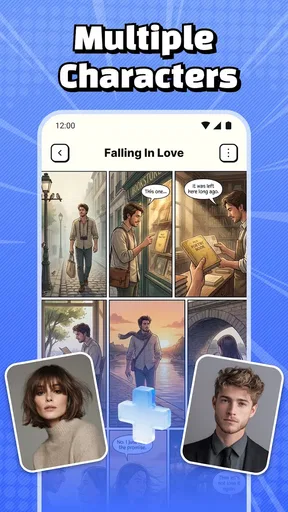
I can see Koma working well for a curious beginner, a fan who wants to sketch out a personal manga premise, or a writer who thinks visually but doesn’t want to start with a blank drawing canvas. It can also be handy for low-pressure creative sessions: make a short scene during a break, try a different visual mood, and decide later whether the idea deserves more work. In that role, the app’s accessible approach is more important than professional-grade control.
It is less suited to someone whose main goal is precise illustration, repeatable character sheets, or meticulous page production. A conventional drawing app gives an artist direct control over lines, layers, and corrections; a page-layout tool is a better fit when exact panel dimensions and lettering placement matter. Koma’s appeal is the possibility of getting from concept to comic quickly, not a guarantee that every generated image will match a tightly defined art direction.
There is also a difference between making something for yourself and preparing work for a broader audience. For a private experiment or a playful draft, small inconsistencies may be part of the fun. For a portfolio piece or a story that depends on visual continuity, I’d plan to review every panel carefully and be ready to revise or recreate parts. If that kind of hands-on checking sounds like a chore, a tool built around manual drawing may be the more satisfying choice.
A realistic way to fit it into a day
Imagine I have ten minutes after work and a premise for a one-page comedy: a character tries to look calm while a small problem grows into a mess. I’d jot down the beginning, escalation, and punchline first, then use Koma to explore a suitable style and turn the beats into a visual sequence. If the first attempt captures the joke, I have a rough version to share or develop. If it doesn’t, I’ve still learned which part of the idea needs rethinking without spending the evening drawing from scratch.
That workflow is where I see the strongest everyday value: not simply producing images, but using them to think through pacing. A reveal often needs room to breathe; a reaction panel can make a joke clearer than another line of explanation. I’d keep the first pass short, look at the panels in order, and ask whether a reader could follow the action without me explaining it. That check is useful even when the images are appealing on their own.
For a longer story, I’d work in small scenes instead of trying to generate an entire chapter in one go. It makes it easier to catch a character or setting drifting away from the idea, and it gives me a natural stopping point if the app’s AI tools aren’t available or the connection is unreliable. Since AI features need a decent internet connection to work smoothly, I’d avoid relying on Koma as an offline-first sketchbook when I know I’ll be away from a stable connection.
Getting Started with Koma
First things first, downloading Koma - AI Manga & AI Comics is as straightforward as it gets. A quick search on the app store, a tap on the install button, and bam, you're in! Setup is a breeze, and within moments, I was greeted with a sleek interface that screams creativity.
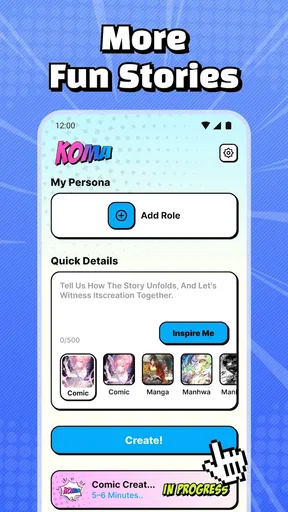
The app doesn't waste time with complicated tutorials. Instead, it gently nudges you to start exploring its features, which I think is a clever move. You quickly get a feel for the app's capabilities, and before you know it, you're crafting your own manga panels.
Features That Stand Out
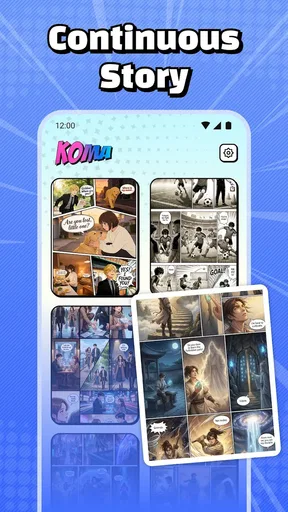
Now, let’s talk features. The app packs a punch with its AI-driven tools. Imagine having an AI sidekick that helps you draw intricate manga characters or stunning comic landscapes. The AI suggestions are pretty spot-on, lending a hand when my imagination hit a wall.
With a few taps, I could select different art styles, and the AI would adapt. Want a classic manga look? Done. Prefer something more avant-garde? Easy peasy. The flexibility here is impressive.
Another gem is the storyline creator. I was able to outline my story arcs and let the AI fill in the gaps. It felt like having a co-writer who gets your vibe but isn't afraid to throw in some plot twists. Plus, if you’re ever stuck, the app’s community features allow you to collaborate with other users, which adds a social element to the creative process.
Using the App
The user interface is intuitive, with drag-and-drop options that make arranging your panels a breeze. The learning curve is minimal, so you can focus on what matters—your story! I spent hours experimenting with different layouts and art styles, and the app handled everything without a hitch.
One thing I did notice is that while the app is a powerhouse, it does require a decent internet connection for the AI features to function smoothly. So, if you're off the grid, you might find some limitations.
Compared with the usual alternatives in comics, Koma puts AI-assisted ideation and visual experimentation closer to the center than a conventional drawing app does. That can be a real advantage when I want momentum more than fine control. The reverse is true when I need to correct a tiny expression, preserve a character’s appearance across many pages, or place every element exactly where I want it: direct drawing tools give me a more deliberate hand in those jobs.
I’d also distinguish Koma from a simple image generator. A comic needs sequence and readability, not just an attractive picture, and its panel-arranging and story-oriented approach is useful for thinking in beats. Still, I’d judge a finished sequence by whether the action reads from panel to panel, rather than by how striking one image looks. For polished lettering, highly controlled layouts, or final production, I’d expect to do more checking than I would for a quick concept draft.
Practical trade-offs before you commit
The free starting point makes it easier to try the creative approach, but the in-app purchase range is broad enough that I’d be deliberate before spending. I’d first test whether the style choices and workflow suit the kind of comic I want to make, then decide whether any paid item solves a problem I actually have. Someone who only wants to make an occasional playful scene may have little reason to pay; a frequent creator should weigh the cost against how often the AI tools save time.
Another useful habit is to keep the story’s essential details in a note outside the app while planning: character names, visual traits, setting, and the order of events. That gives me a stable reference if I pause a project or revise a scene, and it reduces the risk of relying on memory when I return. It is especially worthwhile for a comic with recurring characters, where small differences can distract from the story.
I’d also make a quick continuity pass before sharing anything. Check who is holding an object, where each character is standing, and whether the emotional reaction follows the previous panel. Those details are easy to overlook when I’m focused on choosing an attractive style, yet they often determine whether a comic feels coherent. Treating AI output as a first draft rather than a final authority keeps expectations realistic.
What I’d watch as the app develops
With version 1.0.7 as the current release, I’d be interested in whether future iterations make longer projects easier to manage and give creators more control over recurring characters and panel-to-panel consistency. Those are the areas that would most affect my choice between Koma and a traditional art workflow. They are things I’d watch for, not changes I’d assume have already happened.
For existing users, a newer version number is most useful when it brings a practical improvement to the way they work. I’d check the app’s own update notes before changing a project routine, especially if I have a sequence in progress. A small interface change may be welcome, while any shift in how a familiar tool behaves could mean adjusting a workflow; either way, I’d judge updates by their effect on actual comic-making rather than by the version label alone.
The app’s average rating suggests a mixed reception rather than universal agreement, which matches the kind of tool Koma is: its value depends heavily on whether AI-assisted creation fits your expectations. If you enjoy experimenting and can tolerate some review and revision, it has a clear purpose. If you need dependable, exact control from the first panel to the last, that same uncertainty can feel like friction.
Final Thoughts
Overall, Koma - AI Manga & AI Comics is a fantastic tool for both budding and seasoned manga artists. It combines the magic of AI with the artistry of comics, making storytelling accessible to everyone. Whether you're an aspiring artist or just someone who loves a good story, this app is worth checking out.
So, next time you're lounging on the couch, dreaming up your manga universe, remember that Koma is just a tap away, ready to turn your imagination into reality. Give it a whirl, and who knows? You might just create the next big hit in the manga world!
My own recommendation is more measured: I’d try it if I wanted a friendly way to turn a loose premise into a visual draft, and I’d keep a drawing app nearby if the project called for exact control. Koma is most convincing as a place to test ideas, explore styles, and find a story’s visual rhythm. Go in ready to guide and review the AI, and the experience is more likely to feel creative than frustrating.
Pros
- Stunning AI-generated artwork.
- Easy-to-navigate interface.
- Regular content updates.
- Customizable reading settings.
- Offline reading mode available.
Cons
- Limited free content access.
- Requires stable internet for updates.
- Occasional ads interrupt reading.
- Subscription model can be pricey.
- In-app purchases are frequent.
FAQs for Koma - AI Manga & AI Comics
What is Koma - AI Manga & AI Comics?
Koma - AI Manga & AI Comics is an innovative app that allows users to create and explore manga and comic content using AI technology. It provides intuitive tools for artists and enthusiasts to generate high-quality illustrations and stories, making it accessible for both beginners and experienced creators.
How user-friendly is the interface of Koma?
Koma offers a highly user-friendly interface designed to cater to all skill levels. With intuitive navigation and easy-access tools, users can start creating with minimal learning curve. Tutorials and guides are also available within the app to help users maximize their creative potential.
What are the key features of Koma?
Koma includes features such as AI-powered art generation, customizable templates, and a community platform for sharing and collaboration. Users can explore a vast library of styles and filters to enhance their creations, making it a versatile tool for manga and comic enthusiasts.
Does Koma require an internet connection to function?
While some features of Koma can be accessed offline, an internet connection is necessary for cloud-based services, updates, and community interactions. To fully utilize all of Koma’s capabilities, including AI updates and template downloads, staying connected is recommended.
Is Koma available for both Android and iOS?
Yes, Koma is available for download on both Android and iOS platforms. Users can find it on the Google Play Store and Apple App Store, ensuring compatibility with a wide range of devices. Regular updates ensure the app runs smoothly on all supported operating systems.


